Axiom and WorldEdit both let you build far faster than placing blocks by hand, and they read the same schematic files. They work in very different ways: Axiom is a visual editor that runs on your own computer, WorldEdit is a command-driven tool that runs where the world runs. This guide compares them as of 28 October 2026 so you can pick one, or use both.
What you end up with
A clear choice for your situation (solo builds, a build server, a paid project), the install steps for it, and a way to move builds between the two.
The short version
- Axiom is a Fabric client mod with a 3D-editor style interface: real-time previews, brushes, sculpting, selections you drag out. It is free for non-commercial use in singleplayer, and it needs a whitelist or a paid licence on servers.
- WorldEdit is a free, open source plugin and mod driven by commands, wands and brushes. It runs on the server (Spigot, Paper, Folia, Sponge) or as a Fabric or NeoForge mod, and anyone with permission can use it on any server that installs it.
- FastAsyncWorldEdit (FAWE) is a faster fork of WorldEdit for Bukkit-based servers. Pick it over plain WorldEdit when many people make big edits.
Side by side
| Axiom | WorldEdit | |
|---|---|---|
| Kind | Client mod with a graphical editor | Plugin and mod, command and tool based |
| Runs on | Your computer (Fabric). The Paper plugin is its server side. | The server (Spigot, Paper, Folia, Sponge), or Fabric and NeoForge for a client or server |
| Minecraft versions | Java, 1.20 up to 26.3 (version 6.1.5) | Java only, 26.3 supported (version 7.4.6) |
| Singleplayer | Yes, free for non-commercial use | Yes, with the Fabric or NeoForge mod |
| On a server | Install the Axiom Paper plugin. Players need op or the axiom.default permission, and a whitelist or commercial licence. | Install the plugin. Nobody can use it until you grant permissions or op them. |
| Licence | All rights reserved, with an end-user licence. Commercial use needs a paid licence. | GPL-3.0, free |
| Interface | Editor mode with windows, tool panels and live previews | Chat commands, a wand, brushes bound to items |
| Schematics | Imports .schem and .schematic, exports .schem, structure NBT and its own blueprints | Reads .schem and legacy .schematic, writes .schem |
| Best at | Terrain, organic shapes, painting and detail by eye | Large regular edits, scripted repetition, server administration |
Axiom
Axiom adds two modes to creative play. Builder mode improves normal building with a hotbar swapper, flight speed up to 10 times, and tools such as move, clone, stack, smear, extrude, erase and symmetry. Editor mode (Right Shift) opens a 3D-editor layout with windows for tools, options, palette, history, clipboard and a blueprint browser.
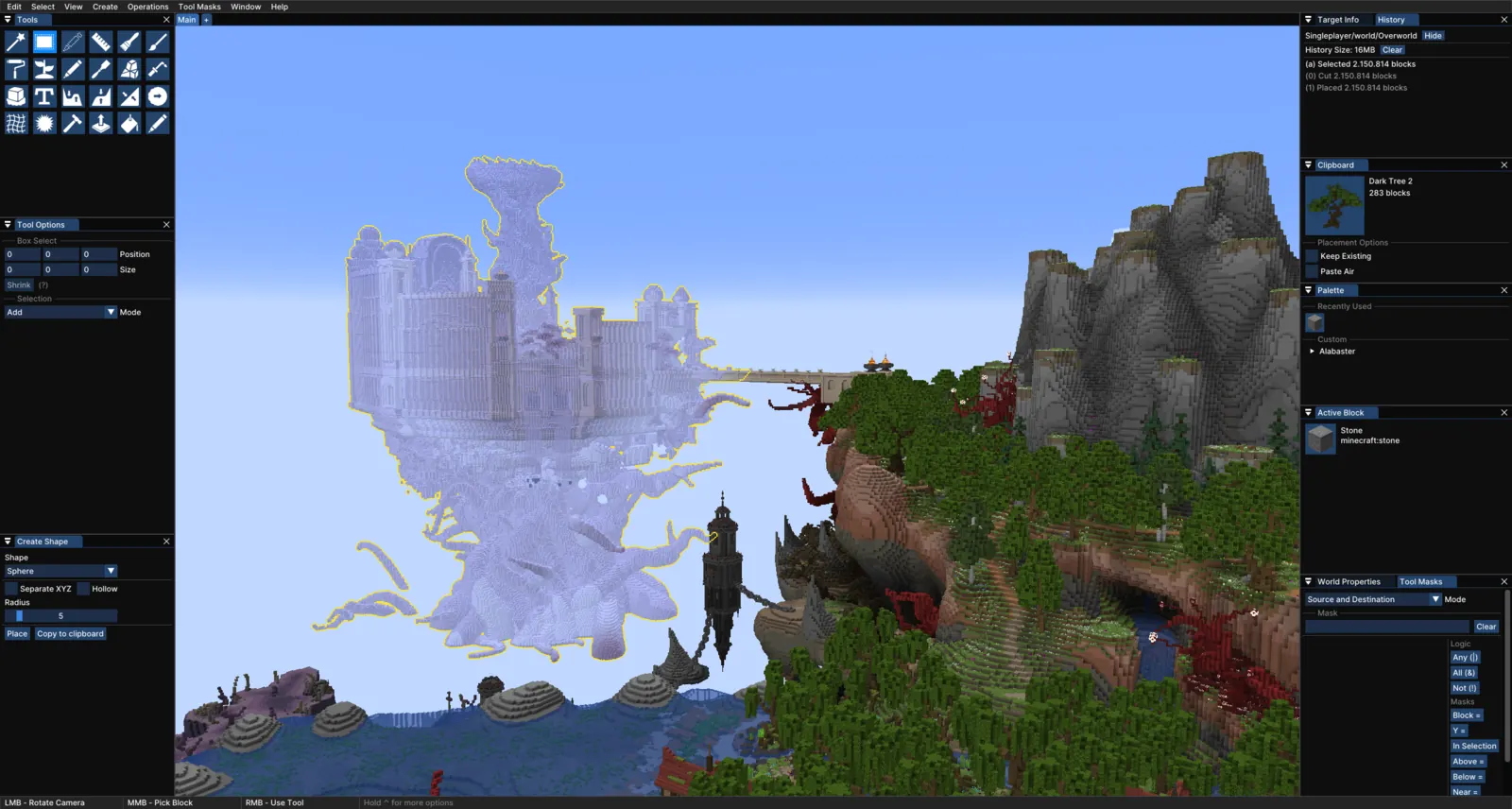
The editor tools are the reason people choose it: magic, box, freehand and lasso selections; painters (including noise and gradient painters); sculpting and drawing tools such as rock, weld, melt, stamp, text, shape and path; heightmap tools with elevation and slope; and smoothing, distort and roughen tools. Everything previews on your screen before it touches the world, which suits terraforming and organic builds where you judge the result by eye.
Licence and servers
Axiom is free for non-commercial use in singleplayer, on a localhost server, and on plot-based servers that whitelist it. On your own private multiplayer server you need a multiplayer whitelist (requested on the Axiom Discord; non-commercial only) or a Commercial License. Axiom grants a 30-day multiplayer whitelist automatically the first time you use it on a server. A request gives 90 days, or 180 days for patrons and Discord server boosters, and can be renewed.
Axiom counts it as commercial use when you make money with it: freelance builders working on commissions, build teams working for marketplace teams, and monetised servers that use builds made with Axiom, even before they are released or profitable. The Commercial License also unlocks multiplayer support, custom server APIs, automatic history persistence, exporting worlds to older versions and annotations in multiplayer. Read the current terms and price on the Axiom site before you rely on it for paid work; this guide does not quote a price because it could not confirm one.
Install
- Install Fabric and the Fabric API. Axiom does not run on Forge.
- Download Axiom for your exact Minecraft version from Modrinth and put it in
mods/. - On a multiplayer server, add the Axiom Paper plugin (MIT licence) to
plugins/, then make sure your players are op or haveaxiom.default. If it still fails, run/whynoaxiomin game.
WorldEdit
WorldEdit works from a selection. You mark two corners with the wand (or //pos1 and //pos2), then run a command on that region: set, replace, copy, paste, stack, generate shapes, smooth. Brushes such as sphere, cylinder, smooth, gravity, forest and deform bind to an item so you can paint with right click. Over 100 functions in total, plus an expression syntax for maths-based shapes and deformations.
Two ideas carry most of its power. A pattern says which blocks to place; a mask says which existing blocks may change:
//set 50%stone_bricks,30%mossy_stone_bricks,20%cracked_stone_bricks
//replace oak_stairs ^stone_brick_stairs
//schem save castle-gate
//schem load castle-gate
The first line fills the selection with a weighted mix. The second turns every oak stair into a stone brick stair and keeps its orientation, thanks to the ^ type-applying pattern. The last two save and load a clipboard as a schematic; they live in plugins/WorldEdit/schematics on Bukkit servers and config/worldedit/schematics elsewhere.
//replace stone_bricks 50%stone_bricks,30%mossy_stone_bricks,20%cracked_stone_bricks: one command ages every brick with the weights you give it.Drawn by BlockLabPlatforms and permissions
WorldEdit is GPL-3.0 and free. It runs on Bukkit-based servers (Spigot, Paper, and Folia builds) and Sponge, and as a mod for Fabric and NeoForge, in a client or on a server. It needs the Java Edition. Out of the box nobody may use it: you either op the people you trust or grant permission nodes such as worldedit.* through a permissions plugin, which lets you give builders only some commands.
WorldEdit has no rich client display by itself. For selection outlines you use //drawsel (cuboids up to 48 by 48 by 48, creative mode only) or a client mod such as WorldEdit CUI on Fabric.
FastAsyncWorldEdit
FAWE is a fork of WorldEdit for Bukkit-based servers (Spigot, Paper, Purpur), GPL-3.0, at version 2.16.1 for 26.3. It processes edits asynchronously, adds per-player limits for changes, memory and regions, and adds more brushes, masks and patterns, more commands, and support for the structure block format. Plugins that depend on WorldEdit also benefit from having FAWE installed. Install one or the other, never both.
Pick Axiom when
- You build alone or with friends on a private world and want to shape terrain, rocks, trees and large organic forms by eye.
- You prefer sliders, previews and undo history in windows to typing commands.
- You are fine with a Fabric client, or your server already runs Paper and you can add the Axiom plugin.
- Your use is non-commercial, or you are ready to buy the Commercial License for paid work.
Pick WorldEdit (or FAWE) when
- You run a server and want builders to work on it with permissions you control, with no client mod.
- You want something free and open source with no licence terms about commercial use.
- Your edits are large and regular: walls, floors, replacing a material across a district, repeating a clipboard.
- You want repeatable commands you can write down and share with your team.
- Your server hosts many builders at once: choose FAWE for its limits and speed.
Use both
Nothing stops you from running WorldEdit on a server and Axiom on your own client. Axiom even draws a box for selections made with //pos1 and //pos2. They share files: Axiom imports a .schem (one at a time, straight into its clipboard) and exports one back, and WorldEdit loads the same file with //schem load. Anything you save as a Sponge schematic moves freely between them.
Common mistakes
- Axiom works in singleplayer, not on the server. The plugin is missing, the player is not op and has no
axiom.default, or there is no whitelist. Run/whynoaxiom. - WorldEdit commands say you lack permission. Nobody has access by default. Op yourself or grant
worldedit.*. - Installing both WorldEdit and FAWE. Pick one.
- Pasting in the wrong place. WorldEdit pastes relative to where you stood when you copied. Stand at a clear reference point, such as the middle of a doorway, before
//copy. - Wrong file type. Use
.schem. The old.schematiccan be read, but WorldEdit can no longer write it. - A mod for the wrong Minecraft version. Both tools release one file per game version. Check the version before you download.
Where BlockLab fits
- Palettes list WorldEdit patterns for each role of a building (fill, frame, roof), ready to paste after
//set. - Gradient exports the smoothest block gradient between colours as a Sponge
.schem, which WorldEdit, FAWE and Axiom paste. - Pick blocks by colour and shape, or check which materials have stairs and slabs in Families, before you write the pattern.
- Read the toolbox entries for Axiom and WorldEdit.
Where to go next
Have a 3D model you want to place as blocks? From a 3D model to a build with VoxelVision ends with a schematic you paste with either tool.