

A giant flower is a build that is easy to like and hard to get right. It works as a landmark in a spawn, a focal point in a garden, or the centrepiece of a fantasy scene, but it only works if the petals separate into a shape. Below a certain size they merge into a blob of one colour. This guide covers where that size is, how a flower is built from stem to centre, how to lay out a garden that does not look like a seed catalogue, and how to make the flowers with the BlockLab flower generator.
What you end up with
- The size where petals read, and what to use instead below it.
- The parts of a flower in blocks, and which blocks suit each.
- A garden plan, and the commands to paste your flowers into a world.
Why build giant flowers
A flower at three to thirty blocks tall is a different object from the vanilla one-block flower. People look up at it, walk under its leaves and stand inside its head. That makes it good for a few jobs:
- Fantasy scenes where plants are the architecture: a spawn between giant blooms, a floating island with a crystal flower on it, a valley of mushrooms and pitcher plants.
- Gardens and parks where a few big flowers give the eye somewhere to land among small vanilla plants.
- Landmarks that read from far away: a sunflower is a tall yellow disc, which can be seen across a map.
The scale where petals read
Petals need blocks to be petals. A head only a few blocks across has no room for a centre, two or three rings, tips that curl and a gap between each. In our own tests, a flower smaller than size L in the generator reads as a blob: the petals are one shape and the stem is a green column. From L, the rings separate and the head has an outline.
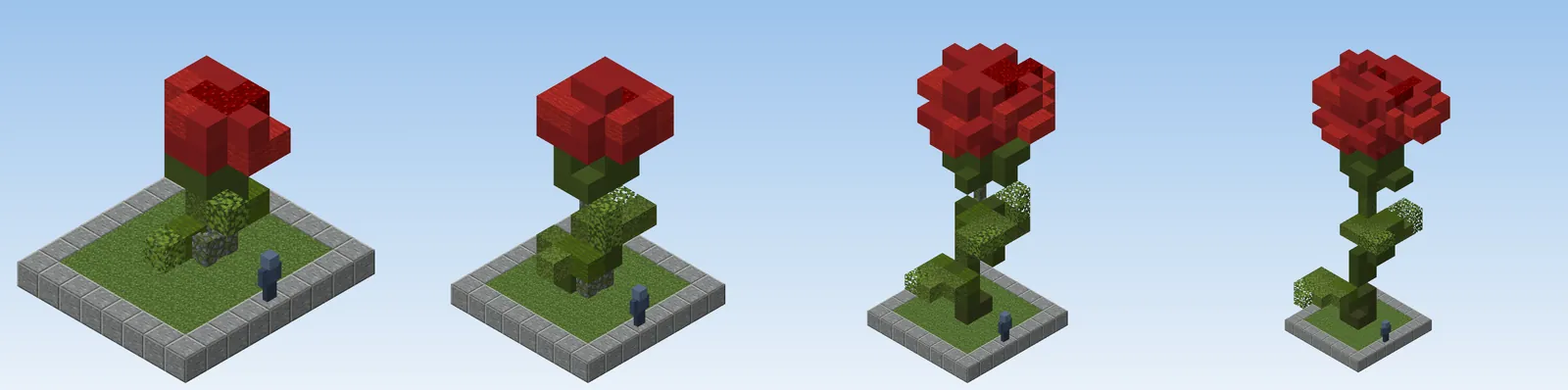
In the generator a rose is 13 blocks tall at M. At L (1.4 times) it is about 18 blocks and its head is wide enough for rings. At XL (1.85 times) it is 29 blocks tall including its leaves, as in the generator screenshot further down. Size is multiplied from the species' own M, so a sunflower (22 blocks at M) is the tallest of the classics.
Below L, do not scale down a giant flower. Use the vanilla plants: pink petals, peony, rose bush and the one-block flowers draw fine detail at the size they were designed for. The rule is the same for trees: see how to make custom trees in Minecraft.
Anatomy of a flower in blocks
- Stem. A stem thinner than a block turns into a wall or a fence; a thicker one is made of green blocks with moss or leaves mixed in. A stem is not straight. It leans, nods or arches, and a stem that carries a heavy head bends towards it. Green concrete and moss block make good stems.
- Leaves. Two to six leaves, lower on the stem and bigger than you think. A leaf is a long flat shape with a paler midrib. Layer them at different heights and angles so they do not repeat.
- Petal rings. The head is made of rings: an inner ring that is smaller and closed, an outer ring that opens and curls back. Each ring has a few petals and the rings turn against each other so petals do not line up. Wool and concrete are the common choices: pink wool and pink concrete in the same petal, for example, so a flat shape shows grain.
- Centre. A dark disc for a daisy or a sunflower, a cluster of stamens for a lily. A darker block in the middle of a bright head is what makes it look like a flower and not a coloured pad.
- Colour. Petals are lighter at the tip and darker at the base, or the reverse. A rim of a deeper block and a few veins make a flat petal read as a surface. Pink terracotta works as a rim round pink petals.
Avoid concrete powder and coral for petals. Powder falls at the first block update and coral dies out of water, so a flower made of them changes after you paste it. The generator does not use them.
Species and families
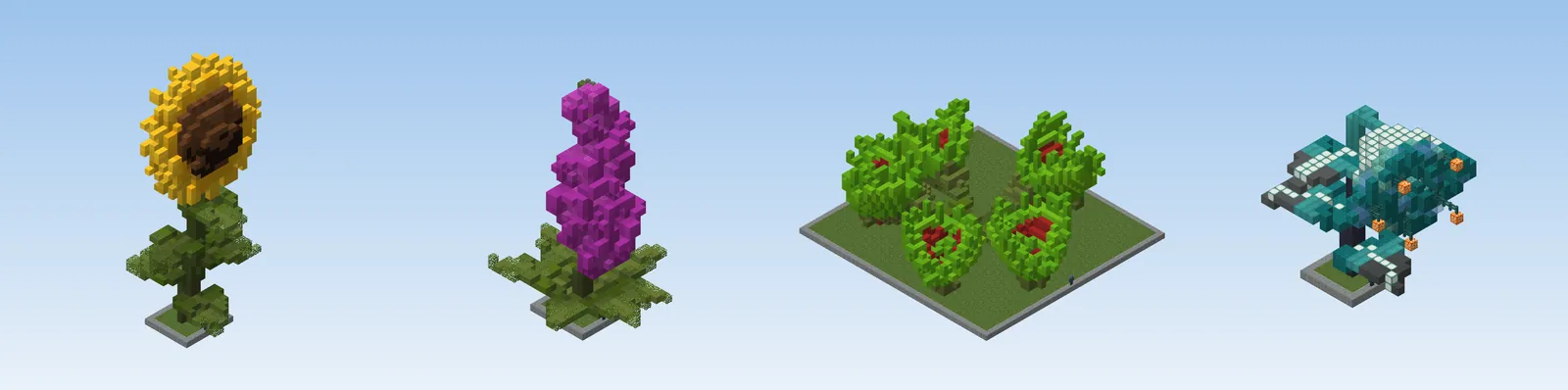
The generator has 30 species in six families, all as settings of the same model:
- Classics: rose, tulip, daisy, sunflower, poppy, lily. A single head on a stem, the most readable shapes.
- Bells and clusters: lily of the valley, bluebell, foxglove, lupine, hyacinth, allium, wisteria. Many small heads on a spike or an umbel. They suit tall, narrow places.
- Water flowers: lotus and water lily, which float on a pond. They come with the water round them, so the paste point is the pond floor.
- Carnivores: Venus flytrap, monster maw, spotted snapper, nepenthes (standing and hanging), trumpet pitcher, cobra lily, sundew. Jaws, urns and sticky tentacles: the most dramatic shapes, and good for swamps and dark scenes.
- Special: rafflesia and dandelion clock.
- Fantasy: crystal bloom, frost lily, ember bloom, lumen, lantern flower. Glassy, glowing and mineral blocks, made for floating islands and caves.
Each species has natural colours and a colourway picker that recolours the petals (or the trap or pitcher, for a carnivore), so one species gives you a whole bed.
Design a garden
- A few big flowers, not many. Three to five giant flowers in a garden of ten by twenty blocks is plenty. More makes the garden look like a field of identical things, and none of them stands out. Place the biggest where the paths meet.
- Beds by species. Give each species its own bed and its own soil: tall spikes at the back, classics in the middle, low plants in front. Mixed beds work in a cottage garden, but pick a species to repeat in groups of three, odd numbers, at different sizes.
- Layer by height. A garden has a canopy (the giant flowers, 15 to 30 blocks), a middle layer (shrubs, vanilla roses, tall grass) and a ground layer (grass, moss carpet, small flowers). If a layer is missing, the garden looks like a set of objects on a flat plane.
- Mix with vanilla for fine detail. Scatter pink petals, moss carpet, ferns and one-block flowers round the foot of every big flower. This is what stops the join with the ground looking like a cut.
- Paths that curve. A path of gravel or packed mud between beds, two blocks wide, that bends round the biggest flower. Straight paths make the flowers look planted in rows.
- Water and shade. A pond with a lotus or a lily pad in it adds a reflective surface, and a tall tree gives the flowers a sense of scale.
- One colour idea. Pick a palette, for example two warm species and one cool accent, and repeat it across the beds. Browse palettes for block colours that sit well together.
Grow them in the generator
The flower generator runs in your browser. It grows a flower from one parametric model and shows it in real blocks, next to a player figure so you can judge the size.
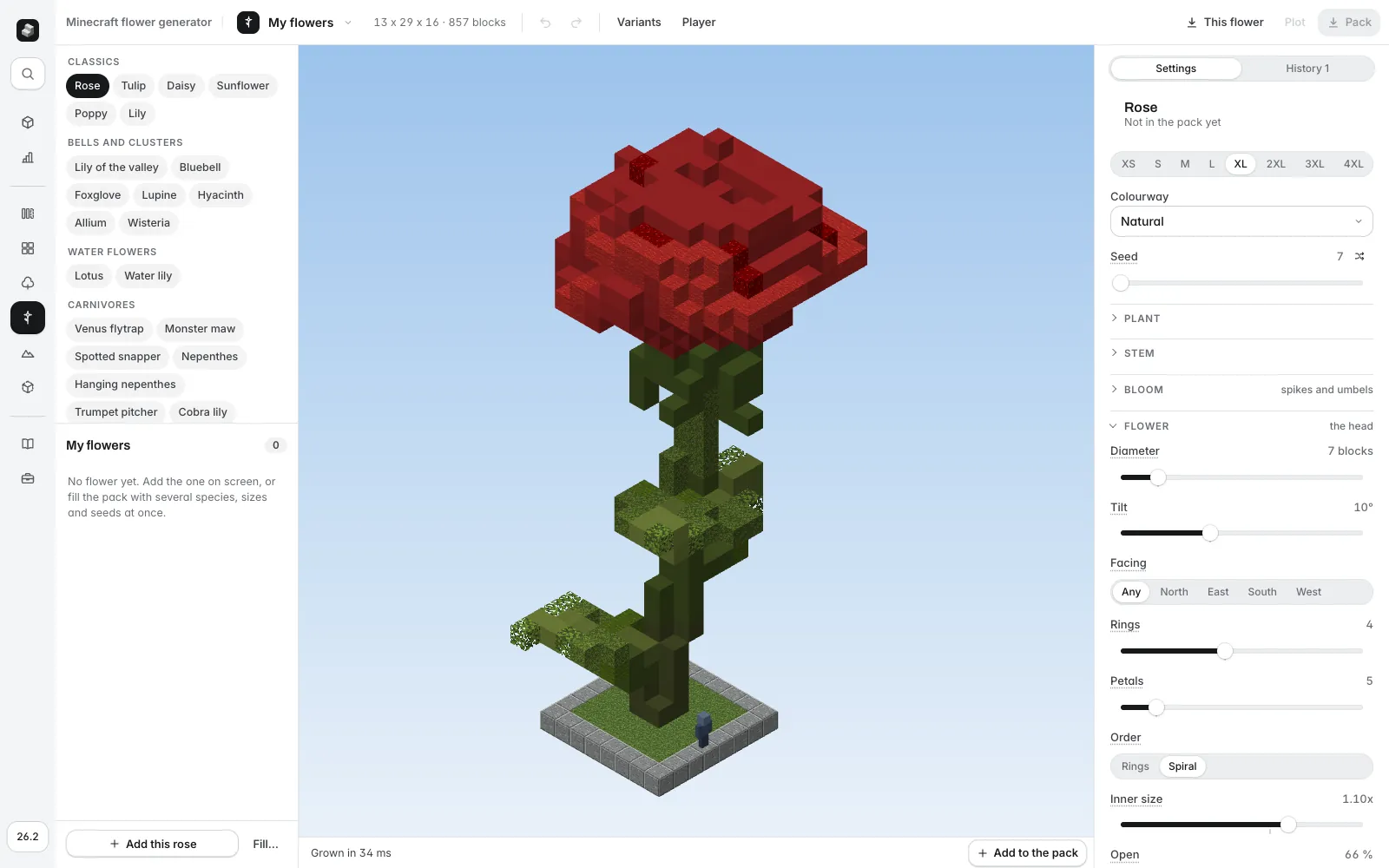
- Pick a species on the left and a size from XS to 4XL. Start at L.
- Choose a Colourway (Natural or another hue) and shuffle the Seed until the shape works. A seed always gives the same flower.
- Open the groups on the right to change the plant. Plant sets height and what the stem carries (a flower, a trap, a pitcher or nothing), Stem sets the form (straight, lean, arch, nod, spiral, droop), Flower and Petals set the head (diameter, rings, petals per ring, outline, curl, ruffle), Centre, Leaves, Colour (gradient, rim, veins), Edges (slabs and stairs for smoother petals) and Ground. The stem and petal palettes are weighted lists of blocks you can edit.
- Press Variants to see nine seeds at once and Player to check scale.
- Press This flower to download one
.schem. Add several to a pack (up to 120), then use Pack for a zip with a folder per species, or Plot for a single schematic that lays out all of them on a plinth, one row per species, so you can see the whole set before you use it.
Honest limits: the generator makes single plants, not gardens, so the layout is yours. It works in full blocks, stairs, slabs, walls, glass and similar, so very fine detail still needs a hand edit. The built-in species are starting points: change any value.
Paste and place
Each flower pastes with the foot of its stem where you stand, so stand on the ground and paste. In WorldEdit or FastAsyncWorldEdit, put the .schem files in plugins/WorldEdit/schematics (or config/worldedit/schematics for the mod) and run:
Two kinds of flower need a different paste point. A water flower pastes from the floor of its pond: dig a pond as deep as the water it carries, stand on the floor and use //paste -a. A hanging plant (the hanging nepenthes) pastes from its anchor, the top block of its stem, so fly to where that block should go, right under a beam or a branch, and paste:
In Axiom, import the file from the File menu (one schematic at a time), then place it with the gizmo and confirm with Enter. For the full steps, read how to import and paste a schematic.
For a bed with many plants, load a species folder from the pack and scatter it with FastAsyncWorldEdit's /brush populateschematic, which takes a folder and a -r flag for a random rotation. Plain WorldEdit pastes your clipboard at each click with /brush clipboard -a.
Common mistakes
- Too small. Under L the head is a blob. Go up a size or use a vanilla flower.
- Too many giants. Five big flowers read as a garden; thirty read as noise. Keep the rest small and soft.
- A bare join with the ground. Cover the foot with moss, grass, petals and small plants.
- One colour for everything. A head of a single block is flat. Mix two or three, with a rim and a darker centre.
- Pasting a water flower on dry land. It needs the pond. Dig first.
- Using powder or coral by hand. They fall or die. Use concrete, wool or terracotta.
Where to go next
Trees belong in the same scene: read how to make custom trees in Minecraft, and grow them in the tree generator. For the ground, see the terraforming guide.