

A tree is the first thing that gives a build away. A column of logs with a ball of leaves on top reads as a lollipop from any distance, and it takes only a few changes to make a tree look like it grew there. This guide covers what those changes are, which blocks to use for each part, how big a tree has to be before its shape shows, and three ways to make one: by hand, with brushes, and with the BlockLab tree generator.
What you end up with
- A checklist for a tree that reads as grown: taper, roots, branch levels, leaf clumps with gaps.
- A block list for each part, and the size at which each family starts to look right.
- A tree schematic you grew yourself and pasted, with the commands for WorldEdit and Axiom.
Grown, not stacked
A real tree is the result of a few rules repeated, and each rule is cheap to copy in blocks.
- The trunk tapers and flares. It is widest at the ground and thins as it climbs. Start two or three blocks wide at the foot, step down to one block near the crown, and let the base spread into the ground. A trunk of constant width is the strongest sign of a stacked tree.
- Roots break the line between trunk and ground. A few blocks of log or stairs running outward and down, half buried, are enough. Mangrove-style roots work for a swamp tree, and moss or grass patches around the foot hide the join.
- Branches come in levels. Primary limbs leave the trunk at different heights and in different directions, secondary branches leave those, and twigs end them. Each level is thinner and shorter than the one below. Three levels are plenty.
- The trunk leans or bends a little. Move the trunk one block sideways once or twice on the way up. A perfectly vertical line looks planted by a machine.
- Leaves are masses, not one sphere. Foliage collects round the ends of branches as clumps of different sizes, with holes where you can see the limbs and the sky. A single smooth sphere reads as a bush on a stick. Break the outline: a few lone leaves outside the mass, bare tips, a flatter underside than top.
- Light sets the colours. Leaves on the lit side are lighter than those in the shade, and the inside of the crown is darker. Even a simple dark-to-light mix of two or three leaf blocks beats a single block.
Blocks for each part
One block per part is the second sign of a stacked tree. Mix a few with weights, so no block covers more than about a third of a part.
| Part | Blocks to mix | Why |
|---|---|---|
| Trunk | Oak log, dark oak log, stripped spruce log | Two or three logs in nearby browns break the bark up. Stripped logs make light streaks. |
| Thin limbs and twigs | Oak fence, mud brick wall | A fence or a wall is thinner than a block, so a branch can taper to a point. Both connect to the blocks beside them on their own. |
| Roots | Mangrove roots, log stairs, moss block | Stairs round the foot give the flare. Mangrove roots can be waterlogged, which suits a shore or a swamp. |
| Leaves | Oak leaves, azalea leaves, moss block | Oak, jungle and acacia leaves take the colour of the biome, so the same block looks different in a swamp. Azalea leaves have a fixed colour. Moss is a flat, dark green for shade. |
| Hanging detail | Vines, glow lichen, moss carpet | Vines hang from the underside of leaves and hide hard edges. Shears are the only way to collect them in survival, so place them from the creative inventory. |
Leaves decay when no log is within 6 blocks (leaves placed by a player never do), and the persistent block state is what marks a leaf as one that stays. The BlockLab generator writes persistent=true on every leaf, so a pasted tree stays as it is. Keep that state in mind if you set leaves some other way. To compare more colours, browse the palettes or the block families.
Tree families
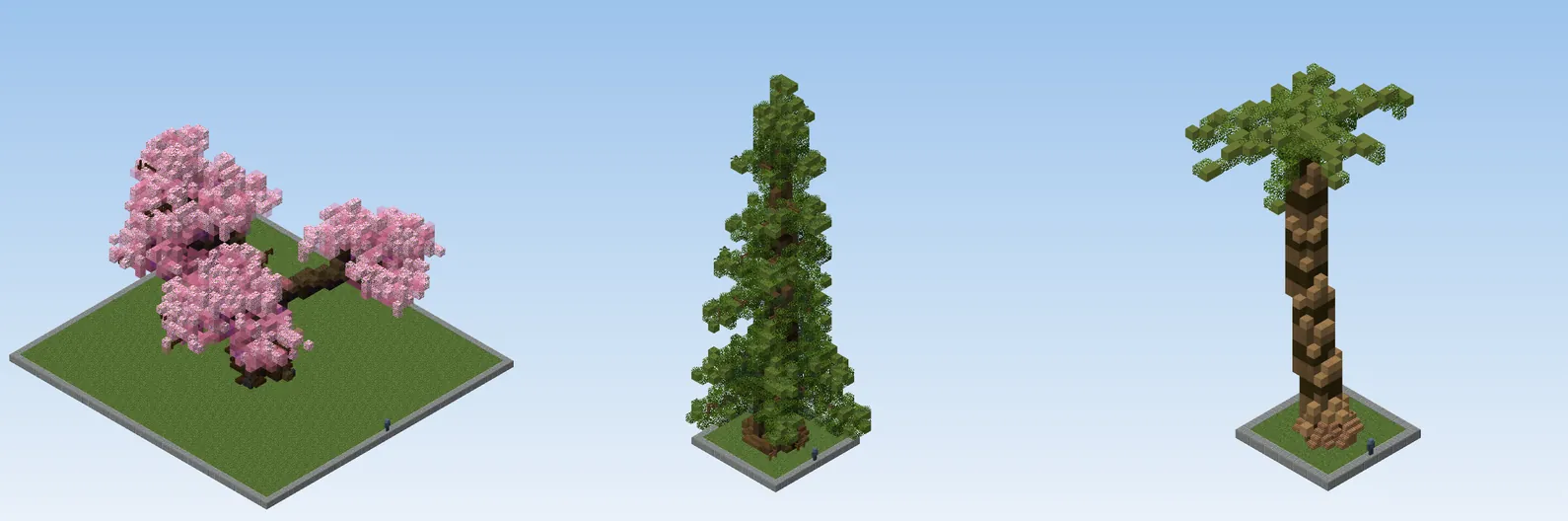
- Broadleaf (oak, great oak, cherry, willow): a wide crown on a trunk that splits. The leaf masses sit on limbs and are broader than tall. A willow hangs its leaves in curtains; a cherry leans and curves, with pink leaf masses on a dark trunk.
- Conifer (fir, redwood): one straight trunk and tiers of foliage that get shorter towards the top. The trunk stays visible between tiers. Tiers that are too regular look like a Christmas tree, so vary their length and drop a few.
- Palm (palm): a long, curved trunk with rings, and a crown of fronds that arch out and droop. Almost all the shape is in the fronds.
- Weeping and giants (baobab, banyan, mangrove): trunks that swell, split or send down extra roots. They need the most width to read.
- Giant mushrooms (fly agaric and seven other caps): a stem and a cap. The mushroom block has a state for each face, so the cap shows its texture outside and pores inside. They are the one family where one wide, smooth shape is right.
Scale: how big is big enough
A tree needs enough blocks to hold its shape. Taper, limbs and leaf gaps all take space: a trunk cannot taper from three blocks to one if it is only five blocks tall. In our own tests of the generator, trees at the smallest sizes read as a lump of blocks, and trees and mushrooms start to read as trees from size M (an oak 24 blocks tall and 1,197 blocks in total).
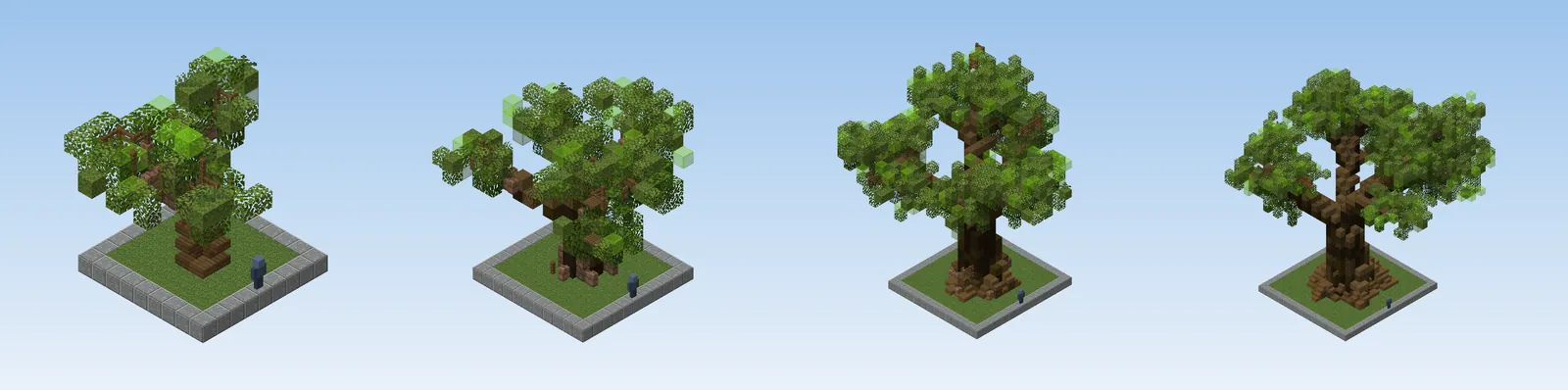
A practical rule: for a tree people will see up close, go to M or larger. At L and above (an oak about 34 blocks tall) you also get visible bark variation and separate twigs. Below M, do not try to make a small tree: use a vanilla one-block plant for small ground detail (azalea, pink petals, a sapling, a fern, a bush made from two leaf blocks), or a distant tree you only need as a silhouette.
The generator multiplies a species by 0.4 at XS, 0.6 at S, 1.4 at L, 1.85 at XL, 2.6 at 2XL, 3.6 at 3XL and 5 at 4XL. Mushrooms and conifers can go large without trouble; broadleaves past 2XL start to need a lot of leaf blocks, so check the block count in the header before you paste.
By hand, brushes or a generator
There is no single best way. Each has a place.
| Method | Good at | Costs |
|---|---|---|
| By hand | One hero tree that has to fit its spot exactly: odd lean, growing through a ruin, shaped by the build around it. | Time. A large tree is thousands of blocks, and the leaf masses are slow to get right. |
| Brushes (WorldEdit, Axiom) | Shaping foliage by eye, smoothing and roughening a crown, scattering a copied tree over terrain. | The trunk and branches still need a plan. WorldEdit's /brush forest plants the vanilla tree types, which are the shapes you are trying to move away from. |
| A generator | Many trees of one style that all differ, at many sizes, from a coherent set of rules. | It makes a tree, not your scene. Expect to place it, then hand-edit where it meets your terrain. |
A good workflow mixes them: generate a few trees, paste them, then fix the three or four that stand in sight by hand with a brush. A pasted tree is only blocks, so you can edit it like anything you built.
Grow one in the generator
The tree generator grows trees from one parametric model in your browser. There is nothing to install, and the trees are shaded in real Minecraft blocks.
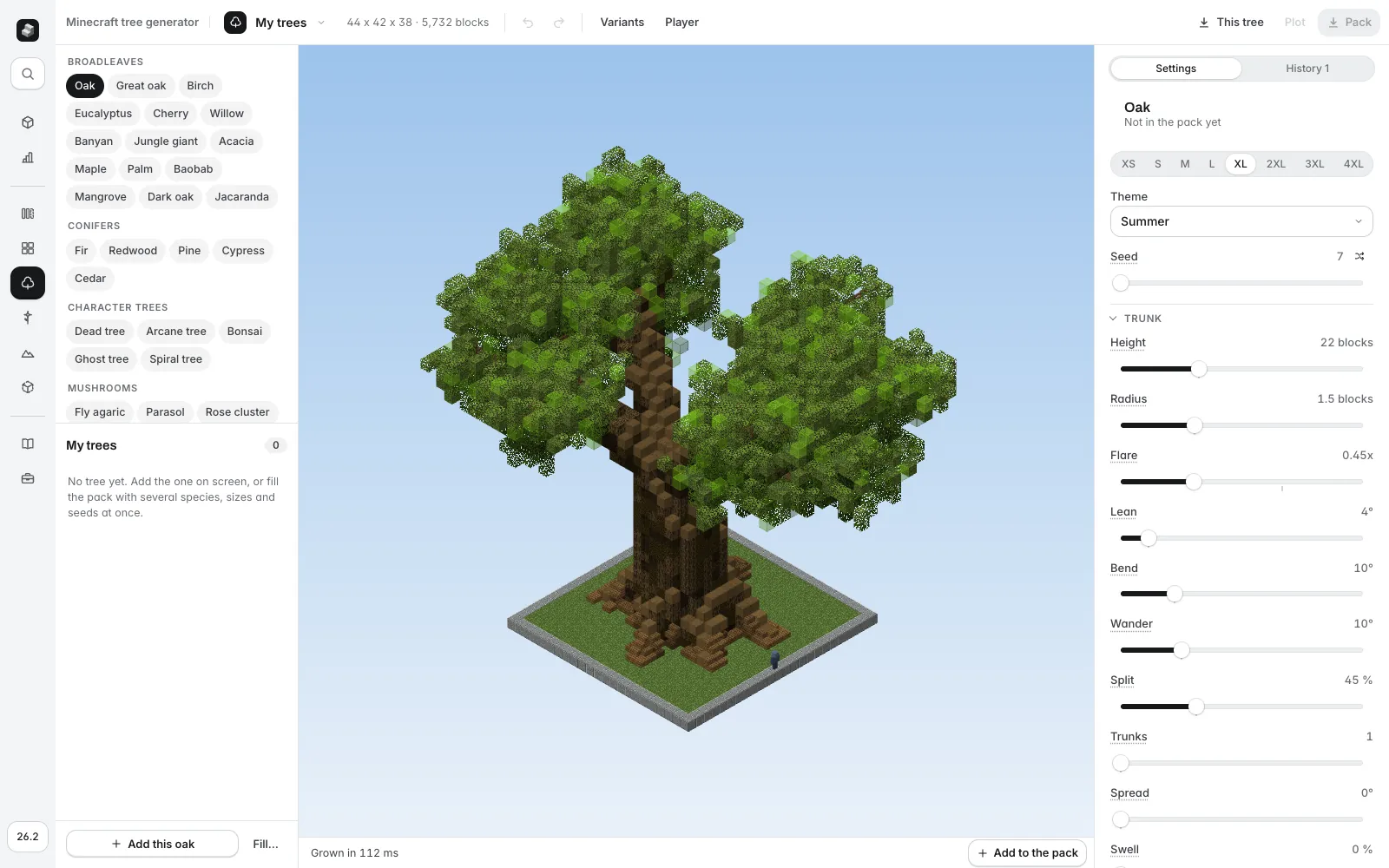
- Pick a species on the left (the list is grouped as broadleaves, conifers, character trees and mushrooms) and a size. Start at M or L.
- Press the shuffle button next to Seed until the silhouette suits you. A seed always gives the same tree, so you can come back to it.
- Check the Theme (summer, autumn, spring, winter and others change the leaf palette) and, if you want to go further, open the groups on the right: Trunk (height, radius, flare, lean, bend, split), Limbs, Branches, Twigs, Crown, Leaves (form, size, fill, lone leaves, drips), Roots, Light and Details. The bark and leaf palettes are weighted lists you can edit block by block.
- Turn on Player to put a player figure next to the tree and judge its scale, and Variants to see nine seeds at once.
- Press This tree to download one schematic, or add trees to a pack (up to 120) and download the zip. A pack has one folder per species and a plot file that lays every tree out on a plinth for a quick look.
The header shows the size in blocks and the block count. The server version picker in the sidebar sets the Java version the schematic is written for.
Honest limits: it makes trees on flat ground, it does not know about your terrain, and it works in full blocks, stairs, slabs, fences and walls, with no entities. The built-in species are starting points, not fixed models.
Paste it in your world
The file is a Sponge .schem. Its paste point is the foot of the trunk, so stand on the ground where the tree should be and paste. In WorldEdit or FastAsyncWorldEdit, put the file in plugins/WorldEdit/schematics (or config/worldedit/schematics for the mod) and run:
-a skips air, so the empty parts of the tree's box do not carve into the terrain around it. In Axiom, use File, Import Schematic (one file at a time, loaded into your clipboard), press Ctrl+V to place it, move it with the gizmo, rotate it with Ctrl+R and confirm with Enter. Ctrl+P saves the clipboard as a blueprint, to reuse the tree from the Blueprint Browser. For every step and the limits, read how to import and paste a schematic.
To plant many trees, load one species as your clipboard and bind it to a brush. With FastAsyncWorldEdit, populateschematic takes a folder, so the species folder from a pack scatters different seeds, and -r rotates each one at random:
The first line is FastAsyncWorldEdit only: populateschematic takes a file or folder, a mask, a radius and a number of points. In plain WorldEdit, /brush clipboard -a pastes your clipboard each time you right click, one tree per click.
Common mistakes
- A tree that is too small. Under M, the tree has no room for limbs or gaps. Go bigger or use a vanilla plant.
- One block per part. A trunk of only oak log and leaves of only oak leaves reads flat. Mix three or four weighted blocks.
- All trees the same. Change the seed, and vary the size by a size step or two across a grove. A forest of identical clones is obvious from the sky.
- Trees planted at the same spacing. Group them in clusters of 3 to 5, leave clearings, and let canopies overlap.
- Pasting into a hill and losing the roots. The paste point is at the foot, so a slope can bury the roots on one side. Paste a block lower or use a brush to blend the ground afterwards.
- Forgetting that leaves take biome colour. A tree that looks right in a plains preview can look dull in a swamp.
Where to go next
Giant flowers share the same models and size scale: see giant flowers and gardens in Minecraft. For the ground the trees stand on, read the terraforming guide.